

CNC file interpretation and preview reference. Confirm the result against the CAM setup and machine documentation before production.
Worked example / millimetres / top-face zero
A 6 mm cutter: measure a straight channel
A centerline has no width. This example turns one 80 mm-long movement into a physical groove, so you can distinguish cutter diameter, path length and the finished opening. It also gives a simple reference for investigating a preview that appears to double the selected tool size.
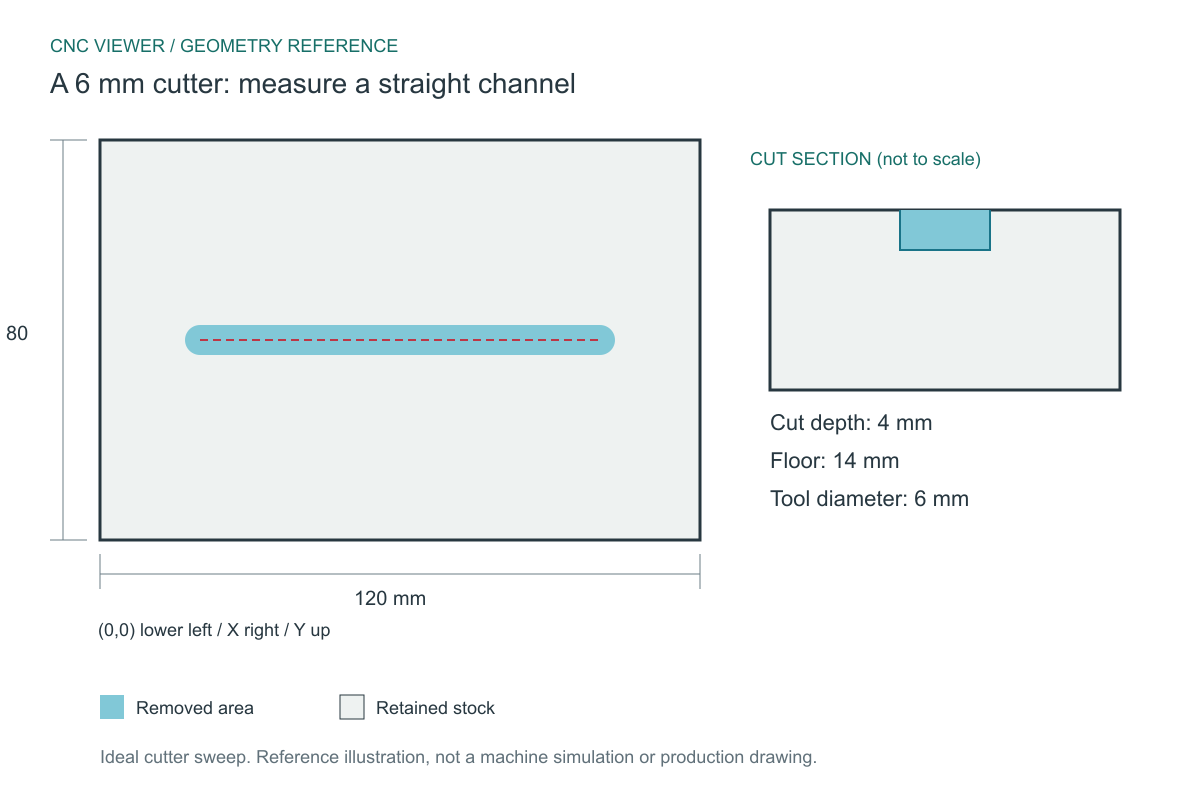
Expected geometry
The reference assumes a cylindrical cutter, exact centerline motion and no controller corner blending. Coordinates start at the lower-left corner of the stock; Z0 is its top face.
| Stock | 120 x 80 x 18 mm |
|---|---|
| Centerline | X20 to X100 at Y40 |
| Cutter | 6 mm diameter / 3 mm radius |
| Removed width | Y37 to Y43 = 6 mm |
| Opening length | X17 to X103 = 86 mm |
| Depth / remaining floor | 4 mm / 14 mm |
Download and inspect the complete program
These original CNC Viewer examples are supplied for learning and preview testing. They omit machine-specific spindle, workholding and tool-length setup, and are not production-ready machine programs. You may reuse them for education and testing.
(CNC VIEWER EDUCATIONAL PREVIEW - NOT A PRODUCTION PROGRAM)
(STOCK X120 Y80 Z18)
(T1 ROUTER D6)
(ZERO X0 Y0 LOWER LEFT - Z0 TOP)
G21 G17 G90 G94
G40 G49 G80
T1 M6
G0 Z5
G0 X20 Y40
G1 Z-4 F200
G1 X100 Y40 F600
G0 Z5
M30
What the important blocks mean
(STOCK X120 Y80 Z18)- This comment supplies the preview stock. Many controllers ignore comments, so this is not a machine work-offset or stock-setting command.
(T1 ROUTER D6)- CNC Viewer reads the diameter from this comment. T1 by itself identifies a tool number and does not prove that the physical cutter is 6 mm.
G0 X20 Y40- The tool is positioned above the start while Z remains at the safe level of 5 mm. This travel does not form a channel.
G1 Z-4 F200- The plunge reaches 4 mm below the top face. With 18 mm stock, the model should retain a 14 mm floor.
G1 X100 Y40 F600- The 80 mm center movement sweeps a capsule-shaped opening. The centerline length and overall opening length are deliberately different.
Reproduce the inspection
- Load straight-channel.nc and confirm the 120 x 80 x 18 mm stock.
- Use Tool Auto or explicitly select 6 mm. Set Offset to Center for this example and start with Medium density.
- In Top view, inspect the rounded endpoints. In a side view, compare the 4 mm removal with the remaining 14 mm floor.
- Change only the diameter to 3 mm. The channel should narrow to 3 mm, with a total opening length of 83 mm; depth stays 4 mm.
If your preview differs
If the 6 mm setting creates a 12 mm-wide groove, the radius may have been applied as a diameter. If the opening is 86 mm long, that is correct: both semicircular ends contribute to the overall length. If the entire panel appears thinner, check Z zero and stock thickness before increasing density.
The expected result is one blind channel with a continuous floor. Increasing mesh density may improve its curved ends, but should not alter any of the dimensions in the table.
Method and reference
The downloadable file is checked with CNC Viewer's G-code parser for stock dimensions, tool diameter and cutting depth; the drilling sample is also checked for its four hole positions. The drawing shows independently calculated ideal geometry, allowing you to compare the viewer against a known reference. It does not certify a machine setup.
Command reference: LinuxCNC: linear feed moves (G1). Controller dialects can differ; consult the manual for the target machine.
Found a mismatch? Send the filename, chosen diameter and offset, plus the expected and observed result to admin@cnc-viewer.com.