

CNC file interpretation and preview reference. Confirm the result against the CAM setup and machine documentation before production.
Worked example / millimetres / top-face zero
Four blind holes from one G81 cycle
A drilling cycle stays active across coordinate-only lines. This example uses one G81 command followed by three locations to create four holes. The geometry is small enough to check by hand, making missing holes and duplicated cycle records easy to identify.
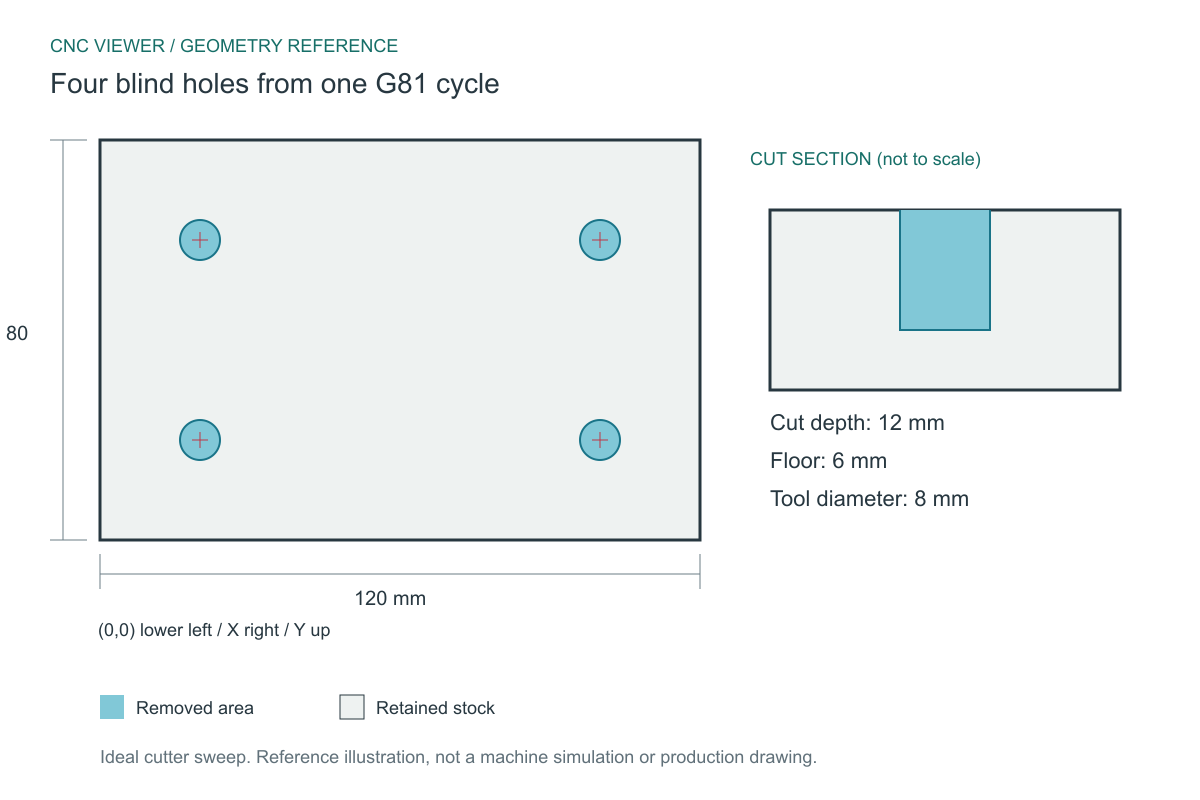
Expected geometry
The reference assumes a cylindrical cutter, exact centerline motion and no controller corner blending. Coordinates start at the lower-left corner of the stock; Z0 is its top face.
| Stock | 120 x 80 x 18 mm |
|---|---|
| Hole centers | (20,20), (100,20), (100,60), (20,60) |
| Diameter | 8 mm |
| Center spacing | 80 mm horizontally / 40 mm vertically |
| Depth / remaining floor | 12 mm / 6 mm |
| Expected operations | 4 vertical blind holes |
Download and inspect the complete program
These original CNC Viewer examples are supplied for learning and preview testing. They omit machine-specific spindle, workholding and tool-length setup, and are not production-ready machine programs. You may reuse them for education and testing.
(CNC VIEWER EDUCATIONAL PREVIEW - NOT A PRODUCTION PROGRAM)
(STOCK X120 Y80 Z18)
(T1 DRILL D8)
(ZERO X0 Y0 LOWER LEFT - Z0 TOP)
G21 G17 G90 G94
G40 G49 G80
T1 M6
G0 Z5
G0 X20 Y20
G98 G81 Z-12 R2 F200
X100 Y20
X100 Y60
X20 Y60
G80
G0 Z5
M30
What the important blocks mean
G90 G21- Positions are absolute and expressed in millimetres. The same numeric coordinates would describe a very different workpiece in inch mode.
G0 Z5- This establishes the initial height used by G98 in this example. It is above the stock and is not part of hole depth.
G98 G81 Z-12 R2 F200- The first hole uses the current X20 Y20 position, an approach plane at Z2 and a bottom at Z-12. The programmed depth below the top is 12 mm, not 14 or 17 mm.
X100 Y20 / X100 Y60 / X20 Y60- These are three separate blocks in the download. Each new location reuses the active drilling cycle, depth and feed.
G80- Cancels the drilling cycle before later positioning. Without this boundary, a parser could incorrectly turn a later coordinate into another hole.
Reproduce the inspection
- Load four-blind-holes.nc with Auto diameter and Medium density.
- Open Statistics. Verify four top-face holes, each 8 mm in diameter and 12 mm deep.
- Open the technical drawing and enable operation dimensions if only overall dimensions are initially shown.
- Measure centers, not opening edges: horizontal center spacing is 80 mm, while the clear gap between two 8 mm openings is 72 mm.
If your preview differs
Only one hole means the coordinate-only blocks may not have inherited the active cycle. More than four holes can indicate that approach and retract phases were counted as separate drilling operations. A through-hole is incorrect here because 6 mm of material remains beneath each idealized flat-bottom bore.
CNC Viewer represents hole depth as operation geometry. A real twist drill has a point angle, and controllers or CAM systems may specify tip depth or full-diameter depth differently. This drawing uses a flat-bottom visualization and does not estimate drill-point breakthrough.
Method and reference
The downloadable file is checked with CNC Viewer's G-code parser for stock dimensions, tool diameter and cutting depth; the drilling sample is also checked for its four hole positions. The drawing shows independently calculated ideal geometry, allowing you to compare the viewer against a known reference. It does not certify a machine setup.
Command reference: LinuxCNC: G81 drilling cycle. Controller dialects can differ; consult the manual for the target machine.
Found a mismatch? Send the filename, chosen diameter and offset, plus the expected and observed result to admin@cnc-viewer.com.