

CNC file interpretation and preview reference. Confirm the result against the CAM setup and machine documentation before production.
Worked example / millimetres / top-face zero
Why a closed contour leaves a solid center
A closed outline does not mean its interior was cleared. This program follows a rectangle once at a constant depth. Comparing the colored centerline with the cutter sweep explains why the central area must remain solid, and how this differs from a pocket-clearing operation.
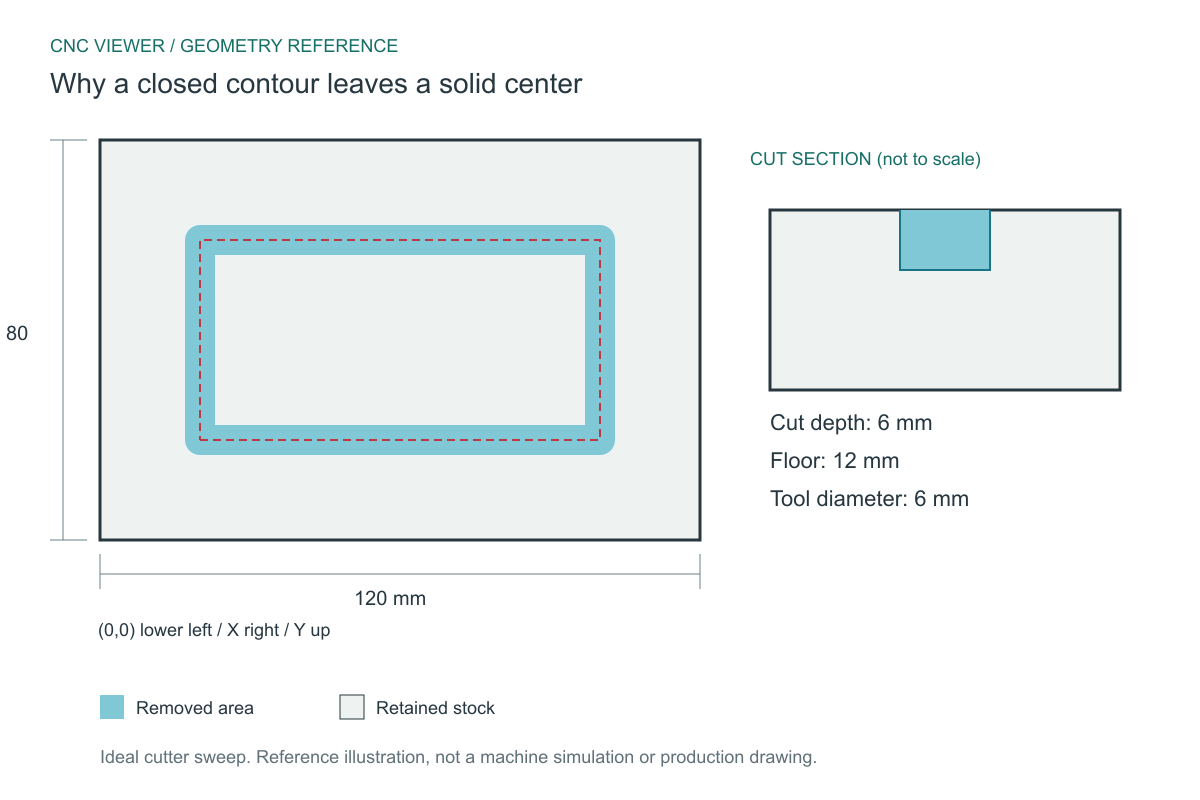
Expected geometry
The reference assumes a cylindrical cutter, exact centerline motion and no controller corner blending. Coordinates start at the lower-left corner of the stock; Z0 is its top face.
| Stock | 120 x 80 x 18 mm |
|---|---|
| Centerline rectangle | 80 x 40 mm |
| Cutter / cut depth | 6 mm / 6 mm |
| Uncut island | X23..97, Y23..57 = 74 x 34 mm |
| Outer sweep bounds | X17..103, Y17..63 = 86 x 46 mm |
| Floor under groove | 12 mm |
Download and inspect the complete program
These original CNC Viewer examples are supplied for learning and preview testing. They omit machine-specific spindle, workholding and tool-length setup, and are not production-ready machine programs. You may reuse them for education and testing.
(CNC VIEWER EDUCATIONAL PREVIEW - NOT A PRODUCTION PROGRAM)
(STOCK X120 Y80 Z18)
(T1 ROUTER D6)
(ZERO X0 Y0 LOWER LEFT - Z0 TOP)
G21 G17 G90 G94
G40 G49 G80
T1 M6
G0 Z5
G0 X20 Y20
G1 Z-6 F200
G1 X100 Y20 F600
G1 X100 Y60
G1 X20 Y60
G1 X20 Y20
G0 Z5
M30
What the important blocks mean
G40- Cancels cutter compensation. The coordinates in this sample are tool-center coordinates, not a finished outside-part boundary.
G1 Z-6 F200- The contour is a blind groove on an 18 mm panel, leaving 12 mm beneath the swept path.
G1 X100 Y20 F600- Cuts the first 80 mm side. A 3 mm radius extends both toward the island and toward the outside stock.
G1 X100 Y60 / G1 X20 Y60- Cuts the next two sides. Joining consecutive cutter footprints removes the corners of the groove without filling its interior.
G1 X20 Y20- Closes the path. Closure changes the topology of the groove, but adds no passes across the island.
Reproduce the inspection
- Load closed-contour.nc. Choose a 6 mm diameter and Center offset; do not force Inside or Outside compensation.
- Use Top view with toolpaths visible. The red center rectangle in this reference corresponds to the programmed path.
- Hide the toolpath to inspect the central surface. It should stay at the original top level rather than becoming a pocket floor.
- Compare with the straight-channel example: both remove only a cutter sweep, even though one path happens to close.
If your preview differs
If the whole interior drops by 6 mm, the preview has treated contour closure as a pocket instruction. If the island disappears entirely, check tool diameter and offset before concluding that the source contains clearing passes. A pocket requires additional overlapping moves or an explicit pocket operation supported by the source format.
At this depth the island is joined to the surrounding panel through the 12 mm-thick floor. A through-cut would separate it geometrically, but this example cannot predict whether a loose piece moves during machining. Holding tabs, fixtures and material behavior need a separate setup review.
Method and reference
The downloadable file is checked with CNC Viewer's G-code parser for stock dimensions, tool diameter and cutting depth; the drilling sample is also checked for its four hole positions. The drawing shows independently calculated ideal geometry, allowing you to compare the viewer against a known reference. It does not certify a machine setup.
Command reference: LinuxCNC: cancel cutter compensation (G40). Controller dialects can differ; consult the manual for the target machine.
Found a mismatch? Send the filename, chosen diameter and offset, plus the expected and observed result to admin@cnc-viewer.com.